
Workflows Configuration
Workflows will allow users to create a series of tasks in a single operation.
The administrator will have the ability to manage the different workflows, which can then be used by users.
Each workflow created by a user will be based on a template. This template will enable the preconfiguration of the various steps of the workflows before they are launched by users.
List of workflow template
All templates available to users will be displayed here.
You will have the ability to search for a workflow, sort the search results, create a new workflow, and modify an existing one.
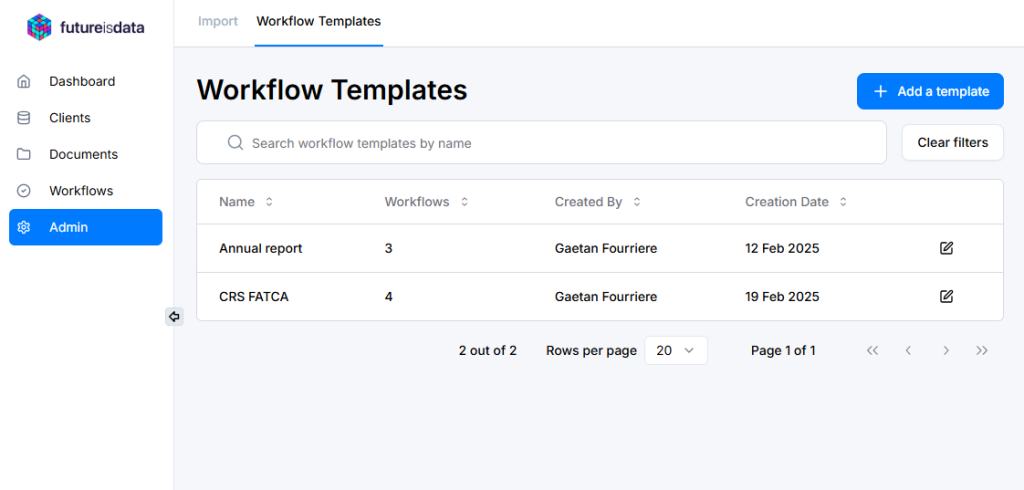
Create a new workflow template
To create a workflow template, simply click on “Add a template”.
Next, you will need to specify for the template these informations:
- Name : The workflow name displayed to users.
- Priority
- Description
- Steps : you can define as many steps as needed. And for each step, you must define:
- Step Title:
- The name of the step assigned to users.
- Owner (Role):
- The step will be assigned to the user matching this role, based on the client selected at the time of creation.
- Deadline:
- When a user creates a workflow, they will set a Start Date. The Due Date for each step will be automatically calculated as: Start Date + Deadline.
- Step Title:
Modify a workflow template
Once a template is created, you can edit it by clicking on the Edit icon.

You will be redirected to the template form, where you can:
- Modify global template information (Name, Priority, Description).
- Edit step details (Title, Owner, Deadline).
- Delete an existing step by clicking on the bin icon.
- Add a new step, which will be automatically placed at the end of the step list by default.
Important
Modifications made to a template will only apply to new workflows and will not affect existing ones.